Table des matières
AgOpenGPS
Dépannage du BNO
Préparation
Pour certains, le BNO055 n’est pas reconnu dans le logiciel AgOpenGPS. Il y a plusieurs causes
et ce document ne traitera que de l’aspect “mauvaise configuration”.
Causes possibles :
- Mauvais branchements
- BNO défectueux
- Mauvaises soudures
- Mauvaise adresse I2C
Préparatifs
Arduino IDE
Pour commencer, ouvrez l'éditeur IDE Arduino.Ensuite, Croquis»inclure une bibliothèque
Cherchez Adafruit Unified Sensor et installez la dernière version
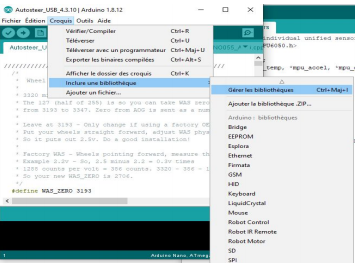 Ensuite, cherchez Adafruit bno055 et installez le aussi.
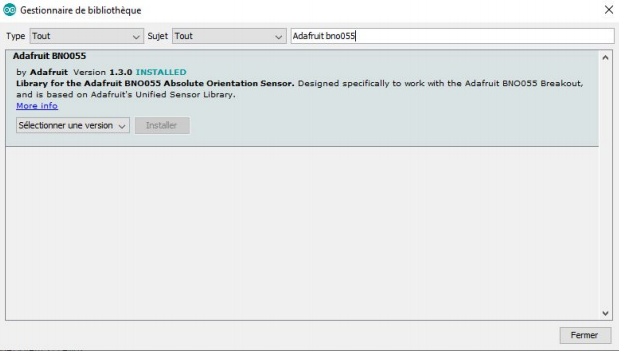 Ensuite, créez un nouveau sketch et collez ce code à l'intérieur
#include <Wire.h>
#include <Adafruit_Sensor.h>
#include <Adafruit_BNO055.h>
#include <utility/imumaths.h>

Adafruit_BNO055 bno = Adafruit_BNO055(55);

void setup(void)
{
Serial.begin(9600);
Serial.println("Orientation Sensor Test"); Serial.println("");

/* Initialise the sensor */

if(!bno.begin())
{
/* There was a problem detecting the BNO055 ... check your connections */
Serial.print("Ooops, no BNO055 detected ... Check your wiring or I2C ADDR!");
while(1);
}

delay(1000);

bno.setExtCrystalUse(true);
}

void loop(void)
{
/* Get a new sensor event */
sensors_event_t event;
bno.getEvent(&event);

/* Display the floating point data */
Serial.print("X: ");
Serial.print(event.orientation.x, 4);
Serial.print("\tY: ");
Serial.print(event.orientation.y, 4);
Serial.print("\tZ: ");
Serial.print(event.orientation.z, 4);
Serial.println("");

delay(100);
}
Televersez le dans votre Nano et ouvrez le moniteur série avec une vitesse de 9600 bauds.
Si Ooops, no BNO055 detected … Check your wiring or I2C ADDR!
c’est qu’il vous faut trouvez la bonne adresse I2C.
— Emmanuel COUVERCELLE 2021/01/19 20:18
Adresse I2C
Pour trouvez l’adresse I2C, vous allez televerser un scanner I2C dans le nano.
prennez le code,
// --------------------------------------
// i2c_scanner
//
// Version 1
//    This program (or code that looks like it)
//    can be found in many places.
//    For example on the Arduino.cc forum.
//    The original author is not know.
// Version 2, Juni 2012, Using Arduino 1.0.1
//     Adapted to be as simple as possible by Arduino.cc user Krodal
// Version 3, Feb 26  2013
//    V3 by louarnold
// Version 4, March 3, 2013, Using Arduino 1.0.3
//    by Arduino.cc user Krodal.
//    Changes by louarnold removed.
//    Scanning addresses changed from 0...127 to 1...119,
//    according to the i2c scanner by Nick Gammon
//    https://www.gammon.com.au/forum/?id=10896
// Version 5, March 28, 2013
//    As version 4, but address scans now to 127.
//    A sensor seems to use address 120.
// Version 6, November 27, 2015.
//    Added waiting for the Leonardo serial communication.
//
//
// This sketch tests the standard 7-bit addresses
// Devices with higher bit address might not be seen properly.
//

#include <Wire.h>


void setup()
{
  Wire.begin();

  Serial.begin(9600);
  while (!Serial);             // Leonardo: wait for serial monitor
  Serial.println("\nI2C Scanner");
}


void loop()
{
  byte error, address;
  int nDevices;

  Serial.println("Scanning...");

  nDevices = 0;
  for(address = 1; address < 127; address++ )
  {
    // The i2c_scanner uses the return value of
    // the Write.endTransmisstion to see if
    // a device did acknowledge to the address.
    Wire.beginTransmission(address);
    error = Wire.endTransmission();

    if (error == 0)
    {
      Serial.print("I2C device found at address 0x");
      if (address<16)
        Serial.print("0");
      Serial.print(address,HEX);
      Serial.println("  !");

      nDevices++;
    }
    else if (error==4)
    {
      Serial.print("Unknown error at address 0x");
      if (address<16)
        Serial.print("0");
      Serial.println(address,HEX);
    }
  }
  if (nDevices == 0)
    Serial.println("No I2C devices found\n");
  else
    Serial.println("done\n");

  delay(5000);           // wait 5 seconds for next scan
}
téléversez le et ouvrez le moniteur série en 9600 bauds et vous devriez trouver 1 ou plusieurs périphériques I2C.l’idéal est de ne laisser branché que le BNO pour ne trouver qu’une seule adresse

Modifications dans le code AgOpenGPS
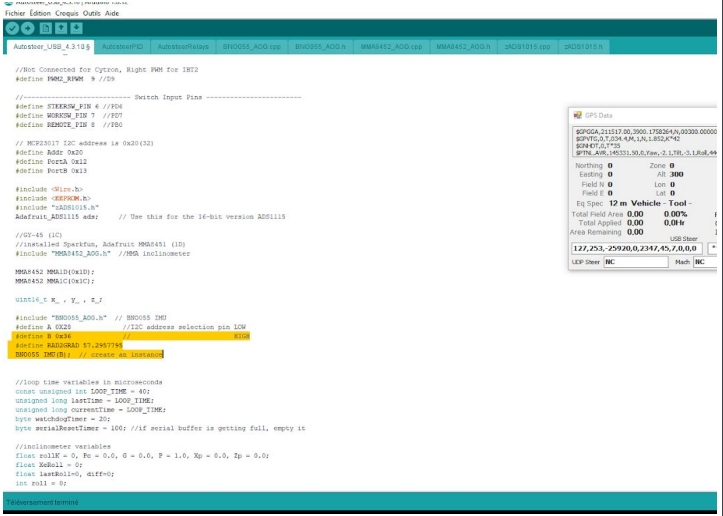
Maintenant il suffit d’ouvrir le code de AgOpenGPS et modifier comme sur la photo l’adresse et la lettre puis de téléverser à nouveau dans le Nano. Maintenant AgOpenGPS devrait le reconnaître
Crédits : Manu COUVERCELLE